
AI Visibility Tracking10 min read
How Canadian Trucking Companies Win on Local Maps With AI Visibility Tracking
Published · RankMonks
Canadian trucking companies win on local maps with AI visibility tracking by checking, terminal by terminal, what AI tools say when someone nearby asks for a carrier or a driving job, then fixing the listings and pages behind any wrong or missing answer. Tracking does not move a map pin by itself. It shows you exactly which pin is wrong, which terminal is missing and which competitor is named instead, so the fixing work goes where it counts.
This guide covers how AI tools answer local trucking questions, which local prompts to track, what to check in each answer, why local answers go wrong for carriers and how to fix them. It is part of our guide to AI visibility for Canadian trucking companies.
Key takeaways
- AI tools increasingly answer local questions with map results and short descriptions drawn from business listings, reviews, directories and websites.
- A carrier should track local prompts for each staffed terminal, for shippers and drivers, and in French where it serves French-speaking areas.
- Each local answer should be checked for the right terminal, address, hours, phone numbers, services and hiring status.
- Most wrong local answers trace back to an out-of-date listing, a duplicate, an unstaffed yard or inconsistent details across sites.
- Fix the source everywhere it appears, then rerun the same prompts in the next cycle to confirm the answer changed.
How do AI tools answer local trucking questions in Canada?
AI tools answer local trucking questions by combining location data, business listings and web pages into a short answer, often with a map or a list of places attached. The details vary by tool and change often, so treat any description of how a specific product works as a snapshot.
Some common patterns:
- Google's AI answers. AI Overviews and AI Mode can answer local questions alongside map results, and Google has been adding Gemini features to Google Maps. These draw heavily on Google Business Profiles and reviews. Our guide to Google AI Overviews explains how those answers are assembled.
- Chat assistants. ChatGPT, Perplexity and others can search the web for local questions and may show places with map details. They draw on business listings, directories, review sites and company websites.
- Voice and phone assistants. Siri and other assistants answer "near me" questions using map data such as Apple Maps listings.
Two things follow for a carrier. First, your business listings matter as much as your website, because they are often the source of the address, hours and phone number in the answer. Second, location changes the answer. The same question asked in Brampton and in Milton can name different carriers, even when they are a short drive apart.
Which local prompts should a Canadian carrier track?
A Canadian carrier should track local prompts for every staffed terminal, written for both shippers and drivers, and in French where it serves French-speaking customers or drivers. Local prompts belong in their own group in your prompt set, reported terminal by terminal.
| Terminal area | Shipper prompt | Driver prompt |
|---|---|---|
| Brampton, ON | "Flatbed carriers near Brampton for steel loads" | "Trucking companies in Brampton hiring AZ drivers" |
| Windsor, ON | "Cross-border carriers in Windsor with FAST" | "Windsor trucking jobs crossing to Detroit daily" |
| Laval, QC | "Transporteur à Laval pour charges complètes" | "Compagnie de transport à Laval qui embauche classe 1" |
| Calgary, AB | "Reefer carriers in Calgary for food distributors" | "Class 1 jobs Calgary home every weekend" |
| Delta, BC | "Container drayage near the Port of Vancouver" | "Drayage driver jobs in Delta" |
Write the prompts two ways: with the city named, and as "near me" questions run from that city if your method allows it. Some tools use the person's approximate location, so a "near me" prompt shows what a local driver or shipper sees. Record which method you used and keep it the same from cycle to cycle.
Cover border towns separately if you have a yard or office near a crossing. Windsor, Sarnia, Fort Erie and Surrey each attract their own cross-border questions.
What should you check in each local answer?
Check each local answer for the six details that send a shipper or driver to the right place, or the wrong one. A mention with the wrong address is not a win.
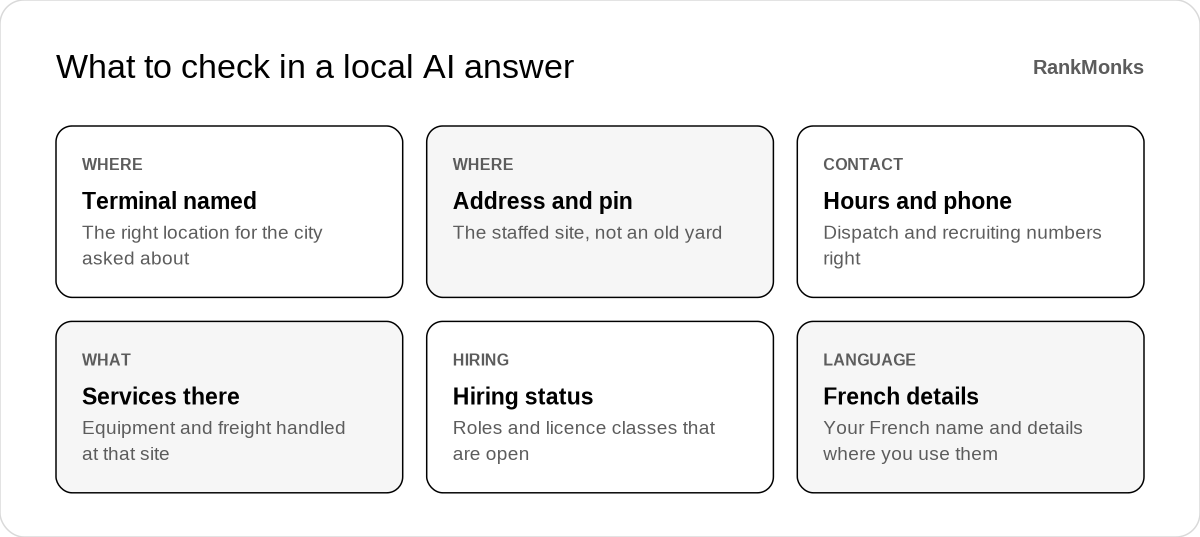
- The right terminal. For a Mississauga prompt, the answer should name your Mississauga terminal, not your head office in another province.
- Address and map pin. The pin should sit on the staffed site, not an old yard, a drop lot or a mailing address.
- Hours and phone numbers. Dispatch and recruiting numbers should be current, and hours should match when someone is really there.
- Services at that site. The equipment, freight types and services handled at that location, not a list copied from the whole company.
- Hiring status. Whether you are hiring at that terminal, for which roles and licence classes.
- French details. Where you operate in French, your French trade name and details should appear correctly in French answers.
Log every error with the prompt, tool, date and the source the answer cited. That source is where the fix starts.
Why do AI map answers go wrong for trucking companies?
AI map answers go wrong for trucking companies mostly because the listings and pages they draw on are wrong, duplicated or inconsistent. Carriers move, open and close yards more often than most businesses, and old details linger.
The usual causes:
- Closed or moved terminals still listed. A yard you left three years ago can still have a live business profile, a directory listing or a page on an old site.
- Unstaffed sites listed as locations. Google's guidelines expect a listed location to be a real place staffed during its stated hours. A drop yard or a parking lot does not qualify, and listing one invites suspension and confusion.
- Duplicates. Two profiles for the same terminal, often one created by a former manager, split reviews and send AI tools mixed signals.
- Name mismatches. Your legal name on one listing, a trade name on another and a French name on a third can make the same carrier look like three companies.
- Inconsistent phone numbers. Tracking numbers, old dispatch lines and personal mobiles spread across directories.
- Thin location pages. A website with one contact page for six terminals gives AI tools nothing to confirm which services happen where.
Our guide to local SEO covers the basics of consistent listings, and our guide to fixing wrong AI answers about your brand explains how to trace an error to its source.
How do you fix what the local tracking finds?
Fix local errors at their source and everywhere that source is copied, update the matching page on your site, then rerun the prompt in the next cycle. Fixing one listing and hoping is not enough.
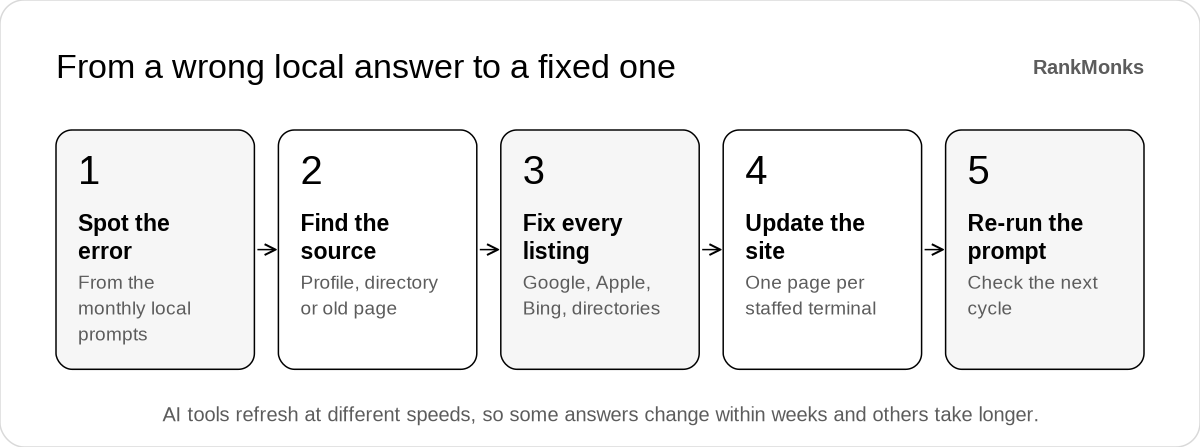
- Spot the error. The monthly local prompts show which terminal, tool and detail is wrong.
- Find the source. Check the citations in the answer, then your Google Business Profile, Apple Business Connect, Bing Places, the main directories, association member listings and job boards.
- Fix every listing. Correct the name, address, phone and hours so they match your fact sheet exactly. Close or remove listings for sites that are not staffed or no longer yours. Merge or remove duplicates.
- Update the site. Give each staffed terminal its own page with its address, hours, phone numbers, services, equipment and open roles, in French too where relevant. Add LocalBusiness structured data that matches the listing.
- Re-run the prompt. Check the same prompt, the same way, in the next cycle. Some tools pick up changes within weeks, others take longer.
Reviews help as well. A terminal with recent, detailed Google reviews from shippers, customers and visitors gives AI tools more to say, and more reason to trust what they say. Ask for them as a routine, never pay for them, and reply professionally. Do not ask your own drivers or other staff for Google reviews: Google treats reviews from current or former employees as a conflict of interest. Point drivers to job review sites such as Indeed and Glassdoor instead, which is where employer reviews belong.
The listing and page work itself is covered in depth in our guide on how Canadian trucking companies win on local maps with SEO. Tracking tells you where to point it.
How do you measure progress on local answers?
Measure local progress terminal by terminal: how often each terminal is named for its local prompts, how often the details are right, and which competitors are named when you are not. A company-wide total hides the terminal that is losing.
Report three numbers per terminal each month:
- Local share of answers. The percentage of local prompt runs that name that terminal.
- Accuracy rate. The percentage of mentions with every checked detail correct.
- Competitors named. The carriers that appear when you do not, and how often.
Pair these with what your listings report, such as calls, direction requests and website clicks from each business profile, and with what recruiters hear from applicants. If the accuracy rate climbs and calls to the right terminal follow, the work is paying off.
What warning signs should you watch for?
The clearest warning sign is drivers or visitors turning up at the wrong gate. Others are subtler:
- Applicants mention a terminal you closed or a licence class you do not hire for.
- Shippers call head office for services that only one terminal provides.
- A competitor with fewer trucks keeps appearing for prompts in your home city.
- French answers name your English trade name, or no carrier from your area at all.
- A business profile shows edits you did not make, or a second profile appears for the same site.
What should you ask a provider about local tracking?
Ask how the provider will cover each terminal, each language and both audiences, and how it will handle location.
- Will you track local prompts for every staffed terminal, not just head office?
- How will you handle location: city named in the prompt, prompts run from each city, or both?
- Will you track driver prompts as well as shipper prompts for each terminal?
- Will you check French answers where we operate in French?
- Will you trace each error to its source and tell us which listing to fix?
If you also run US terminals, our guide on how US trucking companies win on local maps with AI visibility tracking covers American hubs and listings. For the full setup, start with our guide to implementing AI visibility tracking properly for Canadian trucking companies, and for the business case, see why AI visibility is important for Canadian trucking companies.
How does RankMonks approach local AI visibility for Canadian trucking companies?
RankMonks builds local prompts into the fixed prompt set we agree with you, so each terminal you care about is measured the same way every month. We run them across ChatGPT, Claude, Perplexity, Gemini, Grok, and Google's AI Overviews and AI Mode, and record whether each terminal is named, how it is described and who is named instead.
Source analysis is part of the work. We log which listings, directories and pages each answer cites, which of them mention you and which belong to competitors. Each monthly report ends with actions, such as listings to correct, pages to add and claims to fix, and we check the next cycle to see what changed. We do not promise map placements, because nobody controls them. We do show you, in plain language, where you stand and what to do next. The full picture is in our guide to AI visibility for Canadian trucking companies.
Frequently asked questions
Should every trucking terminal have its own Google Business Profile?
Every staffed terminal that serves customers or drivers in person can have its own profile, as long as it is a real location with someone there during its stated hours. Drop yards, unstaffed lots and mailing addresses should not be listed. Keep the name, address and phone number on each profile identical to the matching page on your website.
Why does an AI tool show our old terminal address?
Usually because an old listing, directory entry or web page still shows it. AI tools draw on many sources, and an out-of-date one can outweigh your current site. Find every place the old address appears, correct or remove it, and check the answer again in the next cycle.
Do French listings matter for map answers in Quebec?
They can. If you operate in Quebec, French-speaking shippers and drivers will ask in French, and the answers may draw on French-language sources. Make sure your French trade name, address and services appear consistently on your listings and on French versions of your terminal pages.
How often should we check local AI answers?
Check them as part of your monthly tracking cycle, with each terminal's prompts run several times. If you have recently moved or opened a terminal, add a short weekly check on that location's prompts until the new details show up correctly.
Local answers are where a carrier's address, phone number and hiring status reach the person ready to act. Tracking them terminal by terminal is part of our AI visibility tracking service. If you want to see what AI tools say about your terminals, start a conversation.
Written by RankMonks.