
SEO8 min read
Site Architecture: How to Structure a Website for SEO
Published · RankMonks
Site architecture is the way a website's pages are organised and linked together. It decides how easily a visitor can find a page, how easily a search engine can crawl it, and how clearly the site shows what it is about.
This guide covers what a good structure looks like, how to plan one from keyword research, how URLs and navigation support it, and how to restructure an existing site without losing rankings.
Key takeaways
- A good site architecture keeps every important page within about three clicks of the homepage and groups related pages together.
- Hub pages that link to supporting pages, and are linked back from them, show search engines which topics the site covers in depth.
- The structure should come from keyword and topic research, with one page for each distinct search intent.
- URLs, navigation and breadcrumbs should all reflect the same hierarchy, so that people and crawlers get one consistent picture.
- Restructuring is risky without a redirect map, so every old URL needs a planned destination before anything moves.
What is site architecture and why does it matter for SEO?
Site architecture is the hierarchy of pages on a site and the internal links that connect them. It matters for SEO because search engines rely on that structure to find pages, to judge which ones are important and to understand what each section is about.
Structure affects four things:
- Crawling. Crawlers move through links. Pages buried deep or linked from nowhere are crawled less often, or not at all, as our guide to crawling and indexing explains.
- Authority. Links from other sites tend to point at the homepage and a few popular pages. Internal links pass some of that value on, and the structure decides where it goes.
- Relevance. A group of well-linked pages on one subject tells a search engine the site covers it thoroughly.
- Visitors. People who can see where they are and where to go next stay longer and find what they came for.
Architecture is not the same as design. Two sites can look alike and be organised in completely different ways.
What does a good site structure look like?
A good site structure is shallow and clearly grouped: every important page sits within about three clicks of the homepage, and related pages live together. This is usually called a flat architecture, as opposed to a deep one.
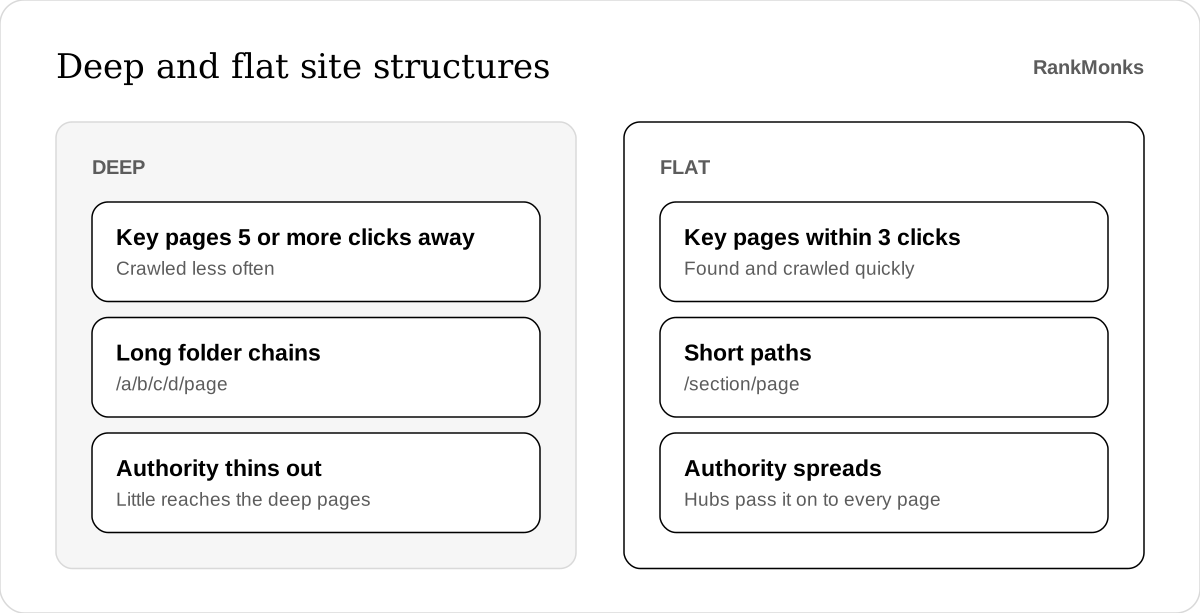
Click depth is the number of clicks it takes to reach a page from the homepage. The three-click figure is a rule of thumb, not a rule published by any search engine, but it holds up well. Pages that take five or six clicks to reach are crawled less often and receive less internal authority.
A good structure has these traits:
- A homepage that links to a handful of main sections. Each one is a clear category a visitor would recognise.
- Sections that link down to their own pages and back up to the section page.
- No orphan pages. Every page you want indexed has at least one internal link pointing to it.
- No dead ends. Every page links onward to something relevant.
- Balance. No section holds hundreds of pages while another holds two.
Flat does not mean shapeless. A site where every page links to every other page has no hierarchy at all, and a search engine learns nothing from it. The aim is few levels, with clear groups inside them.
How do you organise pages into hubs and supporting pages?
You organise pages by giving each main topic a hub page that covers it broadly, then linking that hub to supporting pages that each cover one subtopic in depth. The supporting pages link back to the hub and across to each other where it helps the reader.
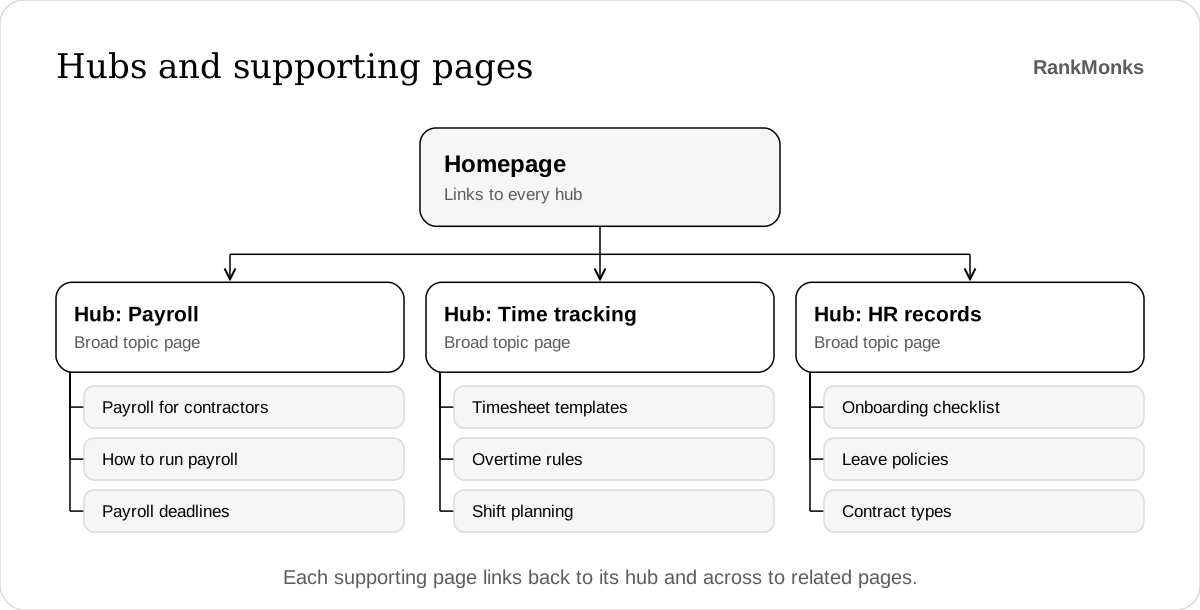
This is often called a hub and spoke model, or a topic cluster. It works because it mirrors how people research. Someone starts with a broad question and then narrows down, and the links follow that path.
The parts are:
- The hub page targets the broad term, such as "payroll software", and summarises each subtopic with a link to the full page.
- Supporting pages target narrower searches, such as "payroll for contractors" or "how to run payroll".
- Links run from hub to supporting page, from supporting page back to hub, and between closely related supporting pages.
On a commercial site, the hubs are often the main service or product category pages, and the supporting pages are a mix of sub-services, guides and comparisons. On a blog, a pillar guide plays the hub role. Our guide to SEO in the AI era is built this way, with shorter articles covering each step in more detail.
Clusters are also how you build topical authority, because they show sustained coverage of a subject instead of scattered single posts. The linking rules themselves are covered in our guide to internal linking.
How do you turn keyword research into a site map?
You turn keyword research into a site map by grouping keywords by intent, assigning each group to one page, and arranging those pages into a hierarchy. The research tells you which pages should exist, and the map shows where each one lives.
A workable process:
- Gather your keywords. Start from your keyword research list, including questions from sales calls and support tickets.
- Group by intent. Keywords that one page could satisfy belong together. Check the live results: if two terms return the same pages, they share a search intent and form one group.
- Assign one page per group. Two pages chasing the same intent compete with each other, a problem known as keyword cannibalisation.
- Sort groups into topics. Broad groups become hubs, and narrower ones become supporting pages beneath them.
- Match against existing pages. Mark each planned page as keep, improve, merge, create or remove.
- Draw the map. A spreadsheet with one row per page is enough: URL, parent page, target keyword group, page type and status.
For example, a project management software company might find that its research falls into four topics: features, use cases by team, comparisons with rivals, and guides to project methods. Each becomes a section. "Kanban board software" becomes a feature page, while "what is a kanban board" becomes a guide that links to it.
The map then becomes the source for writing. Each row can be turned into an SEO content brief for the writer.
How should URLs, navigation and breadcrumbs reflect the structure?
URLs, navigation and breadcrumbs should all describe the same hierarchy, so that a visitor or a crawler looking at any one of them gets the same picture of where a page sits. Mixed signals make a structure harder to read.
| Element | Good practice | Avoid |
|---|---|---|
| URLs | Short, lowercase, hyphenated words that show the section, such as /guides/site-architecture |
Dates, IDs, parameters and folders five levels deep |
| Main navigation | Links to the main sections, in words buyers use | Every page on the site in one giant menu |
| Breadcrumbs | The path from the homepage to the current page, with BreadcrumbList markup | Breadcrumbs that follow click history instead of hierarchy |
| Footer | Key pages that do not fit the main menu | Hundreds of keyword-stuffed links |
| Related links | A few closely related pages within the content | Automated blocks of unrelated posts |
Breadcrumbs earn their place twice. They give every page a link back up to its parent, and with schema markup they can replace the raw URL in search results.
Faceted navigation needs particular care. Filters for size, colour, price or location are useful to shoppers, but each combination can create a new URL with almost the same content. Left alone, a few thousand products can produce millions of URLs.
Decide which filtered pages match real searches, such as "red running shoes", and make those indexable. Keep the rest out of the index, and avoid linking to them in ways crawlers follow.
How do you restructure a site without losing rankings?
You restructure a site safely by mapping every old URL to its new one before launch, redirecting each with a permanent 301 redirect, and updating internal links to point straight at the new addresses. Most traffic lost in a restructure comes from skipped redirects.
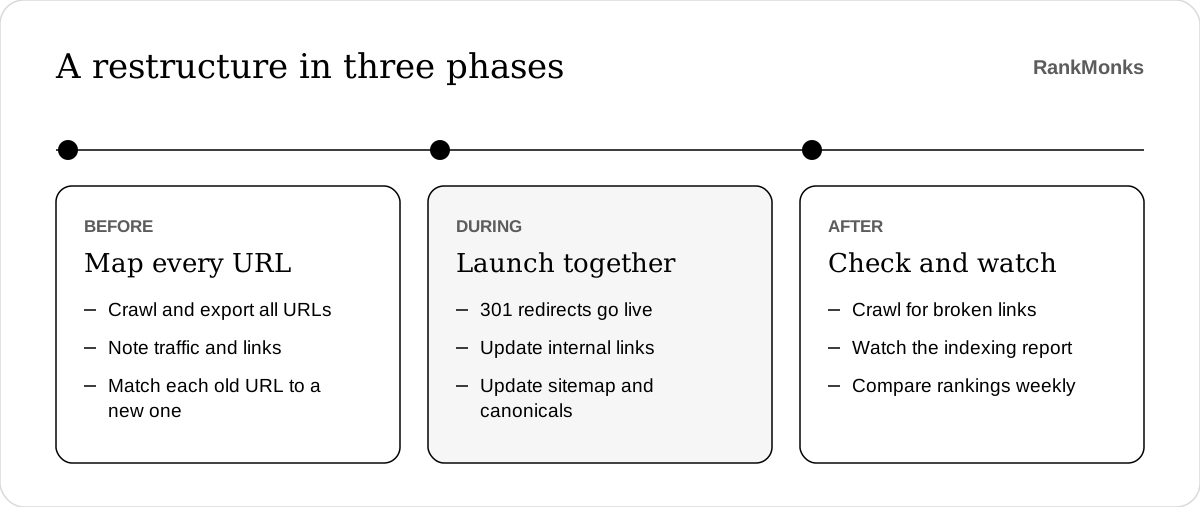
Treat it as three phases.
Before. Crawl the current site and export every URL, along with its traffic, rankings and links from other sites. Build a redirect map with one row per old URL and a specific destination, not a blanket redirect to the homepage. Pages with links or traffic get the most care.
During. Launch the redirects and the new structure together. Update navigation, breadcrumbs, canonical tags, the XML sitemap and internal links so that nothing points at an old URL. Redirect chains, where one redirect leads to another, should be flattened to a single step.
After. Crawl the new site to catch broken links and stray redirects. Watch the Page indexing report in Google Search Console, and compare rankings and clicks for your most important pages each week for the first two months.
Some movement is normal while search engines process the changes. A drop that lasts beyond a few weeks usually points to missing redirects, lost internal links or content that changed more than intended.
Avoid restructuring for its own sake. If the current URLs rank and the hierarchy makes sense, improving internal links often achieves most of the benefit at a fraction of the risk.
Frequently asked questions
What is the difference between site architecture and internal linking?
Site architecture is the overall plan of which pages exist and how they are grouped, while internal linking is the set of individual links that connect them. Architecture is the blueprint, and internal links are how it gets built. A good plan with poor linking still leaves pages hard to find.
How many clicks from the homepage should a page be?
Important pages should be within about three clicks of the homepage. This is a practical guideline, not a published rule from a search engine. Very large sites may need a fourth level, in which case strong hub pages and an accurate sitemap matter more.
Does changing URLs hurt SEO?
Changing URLs carries a risk to SEO, and correct redirects reduce it. Each old URL should send a permanent 301 redirect to the closest matching new page, and internal links should be updated to match. Expect a short period of fluctuation while search engines process the move.
How often should you review your site architecture?
Review your site architecture once a year, and whenever you add a product line, a market or a large batch of content. Sites drift as pages are added one at a time. A yearly crawl shows orphan pages, deep pages and sections that have outgrown their place.
A clear structure makes every other piece of SEO work harder, from content to links. Planning that structure, and the pages that belong in it, is part of our SEO service. If you want a second opinion on your site map, start a conversation.
Written by RankMonks.