
SEO8 min read
Crawling and Indexing: How Search Engines Find Your Pages
Published · RankMonks
Crawling is how a search engine fetches the pages on your site, and indexing is how it stores and understands them so they can appear in results. A page that is not crawled cannot be indexed, and a page that is not indexed cannot rank for anything.
This guide covers how a page travels from published to ranked, how to control what search engines crawl and index, when crawl budget matters, and how to check where your own pages stand.
Key takeaways
- Every page passes through discovery, crawling, rendering and indexing before it can rank, and a failure at any stage stops it there.
- Search engines find pages mainly through links and XML sitemaps, so a page with no internal links pointing to it is easy to miss.
- A robots.txt rule stops crawling and a noindex tag stops indexing, and using the wrong one is among the most common technical mistakes.
- Crawl budget is a concern for very large or fast-changing sites, and most smaller sites never need to manage it.
- The URL Inspection tool and the Page indexing report in Google Search Console show which pages are indexed and why others are not.
What are crawling and indexing?
Crawling is the process of a search engine's software, called a crawler or bot, requesting your pages and reading what comes back. Indexing is the step after it, where the search engine analyses the page and stores it in its index, the database that results are drawn from.
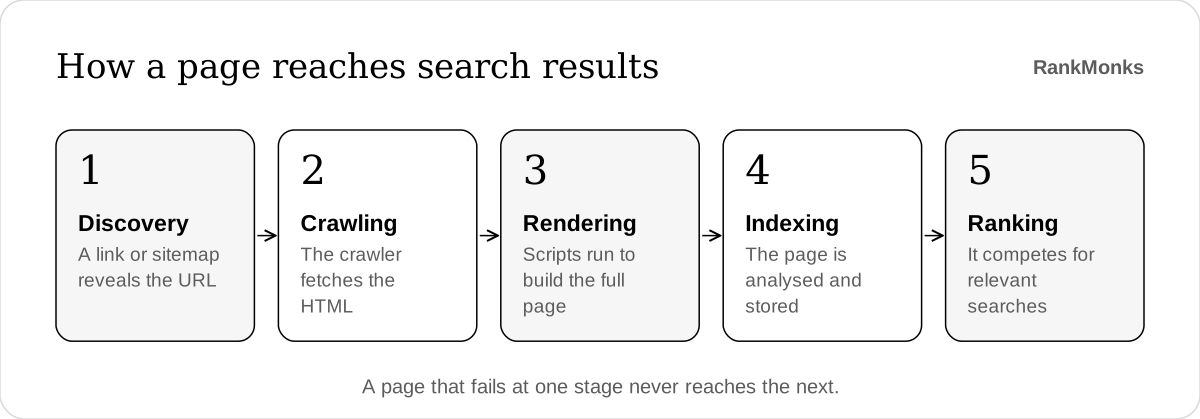
The full journey has five stages:
- Discovery. The search engine learns that a URL exists, usually from a link or a sitemap.
- Crawling. The crawler requests the URL and downloads the HTML.
- Rendering. The search engine runs the page's JavaScript to see the content as a browser would.
- Indexing. The page is analysed, compared with similar pages and stored if it is judged worth keeping.
- Ranking. When someone searches, the engine picks the most relevant indexed pages and puts them in order.
The stages run in order, so a problem early on hides everything after it. Indexing is also a decision, not a right. Search engines leave out pages they consider duplicate, thin or low in value, even when nothing is technically wrong.
If ranking itself is new to you, our guide to what SEO is explains how these stages fit into the wider picture.
How do search engines discover your pages?
Search engines discover pages mainly by following links from pages they already know, and by reading the XML sitemaps you give them. Anything that neither route reaches is unlikely to be found.
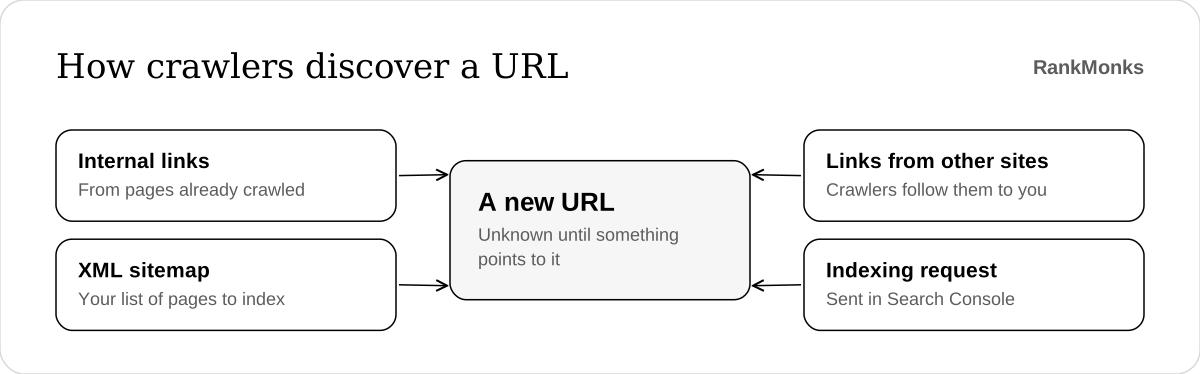
Internal links are the most dependable route. When a crawler reads your homepage, it queues the links it finds there, then the links on those pages, and so on. A page with no internal links pointing to it is called an orphan page, and crawlers may never reach it. Sound internal linking, built on a clear site architecture, is the best discovery tool you have.
An XML sitemap is a file that lists the URLs you want indexed. It helps crawlers find new and deep pages faster, and it tells them when a page last changed. Keep it clean:
- List only the canonical, indexable version of each page.
- Leave out redirects, error pages and anything marked noindex.
- Submit it in Google Search Console and reference it in robots.txt.
Links from other sites also lead crawlers to you, which is one reason a new site with no links can take a while to be picked up.
What is the difference between robots.txt and noindex?
A robots.txt rule tells crawlers not to fetch a URL, while a noindex tag lets them fetch it but tells them not to keep it in the index. They solve different problems, and they do not work together.
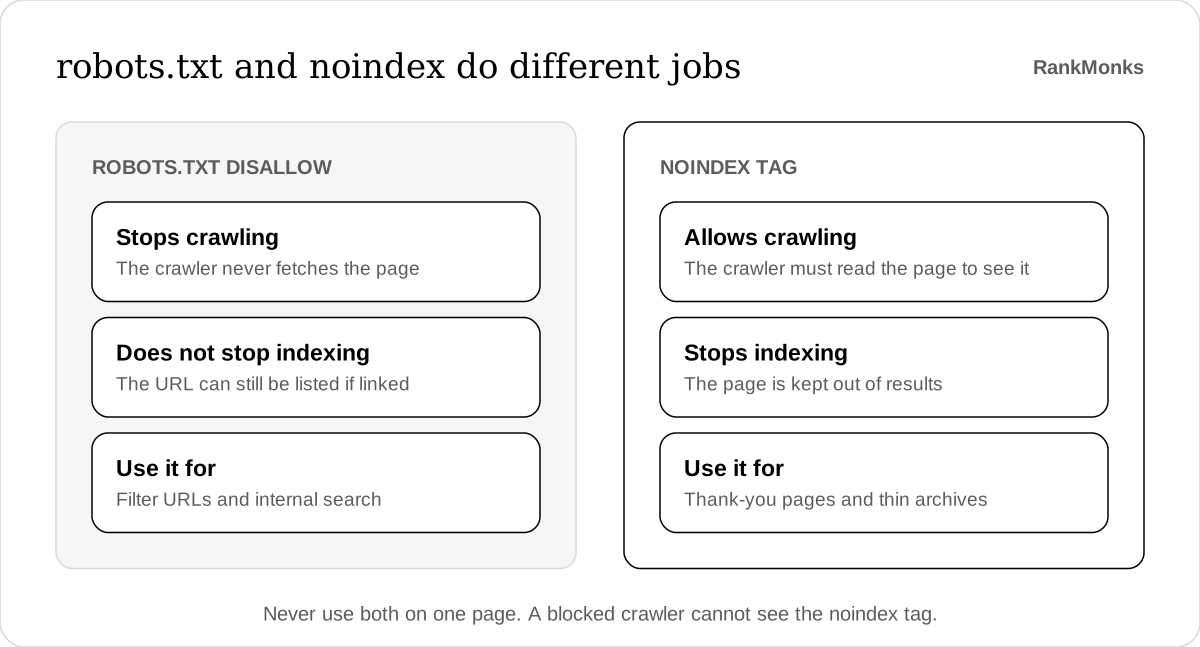
The catch is that a crawler has to read a page to see its noindex tag. If you block the same page in robots.txt, the crawler never sees the tag. The URL can still appear in results, usually with no description, because other pages link to it.
| Control | What it does | Use it when | Common mistake |
|---|---|---|---|
robots.txt Disallow |
Stops compliant crawlers fetching the URL | You want crawlers kept out of areas such as internal search or filter combinations | Using it to hide a page from results |
noindex meta tag or header |
Keeps a crawled page out of the index | A page should exist for visitors but not appear in search | Blocking the same page in robots.txt |
rel="canonical" |
Suggests which of several similar URLs should be indexed | The same content is reachable at more than one URL | Pointing every page at the homepage |
The canonical tag is a hint, not an order. Search engines weigh it alongside your redirects, internal links and sitemap, and may choose a different URL if those signals disagree. Keep them consistent.
None of these is a security measure. A page that must stay private belongs behind a login.
Does crawl budget matter for your site?
Crawl budget matters for very large sites and for sites whose pages change constantly, and it rarely matters for anyone else. It is the number of URLs a search engine is willing and able to crawl on your site in a given period.
Google's own guidance is that a site with fewer than a few thousand URLs is usually crawled efficiently without any special effort.
It becomes a real concern when a site generates far more URLs than it has useful pages. The usual causes are:
- Faceted navigation, where filters and sort orders create endless URL combinations.
- Session IDs and tracking parameters added to URLs.
- Internal search results that crawlers can reach.
- Slow server responses, which make crawlers back off.
For example, a furniture company with 4,000 products might expose millions of filtered URLs once colour, size, price and sort order can be combined. Crawlers spend their visits on near-identical filter pages, and new products wait weeks to be seen.
The fix is to cut the waste at the source. Block worthless parameter patterns in robots.txt, link only to the filter pages worth indexing, and keep the server fast.
How does JavaScript affect crawling and indexing?
JavaScript adds a rendering step between crawling and indexing, and content that only appears after scripts run is at greater risk of being missed or indexed late. The initial HTML is read first, and anything built in the browser has to wait.
Google renders pages with an up-to-date version of Chrome, so it can usually see script-built content. Rendering costs more than fetching, though, so it may happen later than the crawl. Problems arise when:
- Main content, links or meta tags exist only after JavaScript runs.
- Links are click handlers on buttons instead of real
<a href>elements, which crawlers do not follow. - Content loads only after a visitor scrolls, clicks or accepts a prompt.
- Scripts or data files the page needs are blocked in robots.txt.
The safer pattern is server-side rendering or static generation, where the server sends complete HTML and JavaScript only adds behaviour on top.
This matters more now that search engines are not the only readers. The crawlers that feed AI assistants fetch pages in much the same way, and several of them do not appear to run JavaScript at all, so they see only the initial HTML. Our guide to AI crawlers and llms.txt covers how to manage them, and the wider case is set out in our guide to SEO in the AI era.
A quick test: view the page source, not the inspected page, and search it for a sentence from your main content. If the sentence is missing, you depend on rendering.
How do you check whether your pages are crawled and indexed?
Check indexing in Google Search Console, starting with the Page indexing report for the whole site and the URL Inspection tool for single pages.
Work through it in this order:
- Open the Page indexing report. It splits your known URLs into indexed and not indexed, and groups the second set by reason.
- Sort the reasons into expected and unexpected. "Excluded by noindex tag" is fine for a thank-you page and alarming for a product page.
- Inspect important URLs. URL Inspection shows the last crawl date, whether crawling was allowed, the canonical Google chose and the rendered HTML.
- Compare against your own list. Crawl the site with a crawler such as Screaming Frog, then compare its list of indexable pages with your sitemap and with what is indexed.
- Read the Crawl stats report. It shows how many requests Googlebot makes, the response codes it receives and how quickly your server answers.
- Check server logs on large sites. Logs record every request from every crawler, which shows where crawl activity is going.
Two statuses deserve a closer look:
- Discovered, currently not indexed means Google knows the URL but has not crawled it yet. Look at internal links and server speed.
- Crawled, currently not indexed means Google read the page and chose not to keep it. That is usually a quality or duplication question, not a technical one.
These checks are one part of a full technical SEO audit, which also covers speed, structured data and mobile usability. The count of indexed pages is also worth a line in your monthly SEO reporting, because a sudden fall is an early warning.
Frequently asked questions
How long does it take for a new page to be indexed?
A new page can be indexed within hours, or it can take several weeks. Pages on established sites that are linked from the homepage or another well-crawled page tend to be picked up fastest. Adding the URL to your sitemap and linking to it internally are the two most useful things you can do.
Can you force Google to index a page?
You cannot force Google to index a page. The Request indexing button in URL Inspection asks for a crawl, which speeds up discovery, but the decision to index still rests on whether the page is judged worth keeping. If a page is repeatedly crawled and left out, improve the page instead of asking again.
Why is a page indexed even though it is blocked by robots.txt?
A page can be indexed while blocked by robots.txt because the rule stops crawling, not indexing. If other pages link to the URL, search engines may list it without having read it. To remove it, allow crawling and add a noindex tag, or put the page behind a login.
Do AI crawlers follow robots.txt?
The main AI crawlers, including those run by OpenAI, Anthropic, Google and Perplexity, state that they follow robots.txt. Each uses its own user agent name, so you can allow or block them one by one. Compliance is voluntary, as it is for every crawler, so robots.txt is a request and not a lock.
Crawling and indexing are the ground floor of search, and nothing built above them works until they do. Finding and fixing whatever blocks them is where our SEO service starts. If you want a second opinion on your own site, start a conversation.
Written by RankMonks.